Developer-first idea and suggestion management software

Collect product ideas under one roof.

You care about your product. You care what your customers think. You value your time, tools, and independence.

Start with one linkCapture ideas your wayNo sales call

How it works

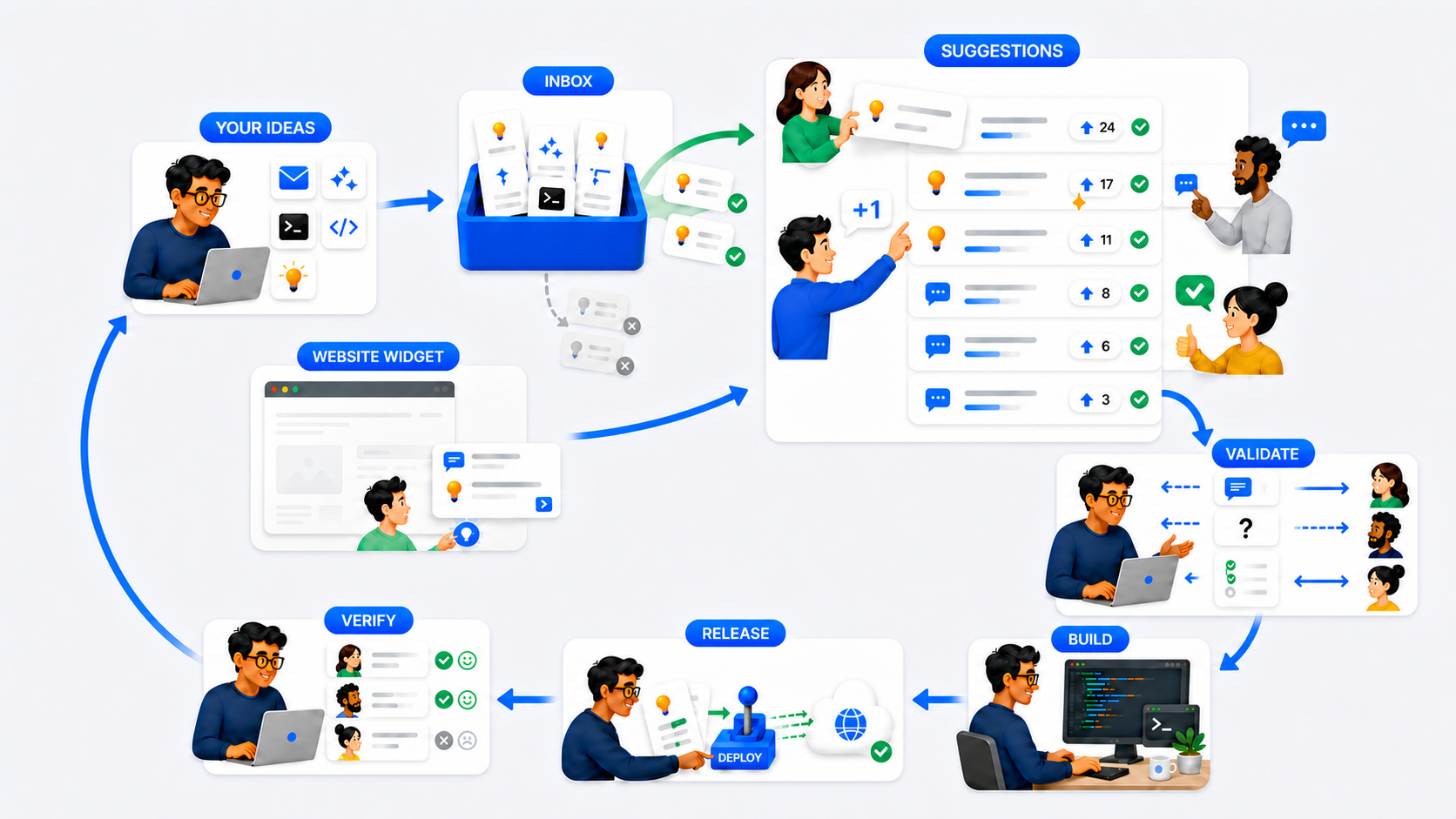
Owner ideas enter a private Inbox while website visitors submit pending Suggestions. Public Suggestions gather participants and move through validation, building, release, and outcome verification.
The complete SuggestionBox.io workflow from private owner capture and customer submissions to a verified result.

An Inbox for Developer Ideas

Your ideas carry weight

You are closest to your product. You know where it could go next.

Send ideas to your Inbox through the web app, email, an AI assistant, the command line, or the API. Every Inbox item shows exactly where it came from.

Add to your Inbox from wherever you work.

Nothing becomes public unless you choose.

Email

A customer sends a useful request. Forward it to your private Inbox while the conversation is still in front of you.

Subject → Inbox title
Message → Inbox body

AI assistant

Connect Codex or Claude once. After that, save a thought in the same conversation and keep working.

sb connect codex
sb connect claude
>_Codex Claude

Add “Let people save filter presets” to my SuggestionBox Inbox.

Added to your Inbox. You can keep working.

The assistant can add ideas. It cannot read or publish them.

Command line

Install the small command-line tool, connect it once, and capture the next idea without leaving your terminal.

Terminal
$ pipx install suggestionbox-connect

 Installed suggestionbox-connect

$ sb connect
Paste the Inbox credential (input hidden):
Connected to your Inbox.

$ sb add --received \
  --title "Export reports to CSV" \
  --body "A customer asked for CSV downloads."
Added to your Inbox.

Add-only API

Build your own way to capture ideas. Your API token can only add Inbox items. It cannot read your Inbox or publish Suggestions.

POST /api/v1/inbox-items/
curl https://suggestionbox.io/api/v1/inbox-items/ \
  -H "Authorization: Bearer $SUGGESTIONBOX_INBOX_TOKEN" \
  -H "Content-Type: application/json" \
  -H "Idempotency-Key: idea-2026-08-21-1" \
  -d '{"title":"Save report presets",
       "body":"Let owners reuse report settings."}'

Web app

Already in SuggestionBox? Open the Add to Inbox form from the header and save a title, a body, or both.

Inbox decisions

Turn Inbox ideas into public Suggestions.

Inbox ideas from you or a teammate can be rough and incomplete. Their source, contributor, and context stay attached while you decide whether to publish, relate, or delete them.

Turn it into a public Suggestion

Finish the wording, choose Improvement, New feature, or Bug report, and publish when it is ready.

Relate it to an existing Suggestion

Keep the original source details as private supporting context without creating a duplicate.

Delete it

Permanently remove ideas you no longer want to keep.

The public side

A public suggestion box for your customers

Visitors notice bugs, missing features, and confusing parts that are easy to miss when you work on the product every day.

SuggestionBox gives your customers two clear ways to tell you what they need:

  • A Public Suggestions Portal
  • Your own Website widget

Your Branded Suggestions Portal

One link. One place for customer suggestions.

A public page at yourcompany.suggestionbox.io where customers submit Suggestions, support the ones they want, and read your official responses instead of repeating the same request across scattered emails and messages.

Open the demo Live read-only demo. No sign-in needed.
It carries your name
Your logo, colors, website link, and a public subdomain you choose.
Participation is email-verified
Suggestions, support, comments, and follows come from confirmed email addresses.
You decide what shows
Set statuses, post official responses, and choose whether new Suggestions go live immediately or wait for approval. Website-widget submissions always wait.
A real branded Suggestions portal where customers can submit Suggestions, show support, filter the list, and see statuses and owner responses.
A branded public Suggestions portal rendered by the real SuggestionBox.io product.

You also get

The Website Widget

Give visitors a way to be heard.

Visitors can tell you what is broken, what could be better, or what they wish existed right from the page where they notice it. Every submission arrives as a Pending Suggestion with the source page attached, so you can review it before anything becomes public.

Add it to your website with one script. <!-- Add before the closing </body> tag -->
<script async src="https://suggestionbox.io/widget.js" data-widget="YOUR_PUBLIC_KEY"></script>
The website widget stays in the lower-right corner of a customer website and creates a pending Suggestion for owner review.

Votes are only the beginning

Turn each Suggestion’s willing participants into a focus group.

Votes tell you what people care about. They don’t tell you what to build. Followers have volunteered to help with that Suggestion, so you can ask what they need before you build and whether it worked after you release.

See where interest gathers

Support, comments, and follows reveal shared need without pretending popularity alone sets your priorities.

Ask before you build

Send eligible followers one focused question or a few quick choices directly from SuggestionBox when you need clarity.

Build with better context

Use answers from the people affected to understand the problem and build with more confidence.

Verify after release

Tell participants what changed, then ask whether the result actually solved what they needed.

No calls. No meetings. Just answers.Send a question through SuggestionBox and get responses from the people who volunteered to help with that specific suggestion.

Founder pricing

One SuggestionBox covers your brand.

Your price does not change when more customers participate.

We don’t count your customers as billable users.

Founder Plan
$5per month

Or $50 per year. Save two months.

Create your suggestion box Lock in Founder pricing. It goes up after the first 100 paying customers.
  • Inbox for Developer Ideas through the web app, email, CLI, API, and AI assistants
  • Website widget with owner-reviewed pending Suggestions
  • Hosted public suggestion portal with your branding and subdomain
  • Optional Weekly Review email covering pending Suggestions, Inbox ideas, and participant activity
  • Improvement, New feature, and Bug report types
  • Verified support, comments, following, and moderation
  • Participant questions, quick choices, updates, and solved checks
  • No participant or submission fees

Straight answers

Frequently Asked Questions

Questions developers ask before adding another tool to their workflow.

What if I don’t receive many suggestions?

It’s about quality, not quantity. Sometimes one visitor uncovers a critical problem you did not know existed. That single report can make SuggestionBox worth having.

If suggestions remain sparse, look at two things first: traffic and visibility.

Traffic
SuggestionBox cannot create an audience for you. If your software has few users or little meaningful traffic, focus on reaching more of the right people first.

Visibility
People cannot participate if they do not know your SuggestionBox exists. Put your portal link somewhere easy to find, add the Website Widget where it makes sense, and invite suggestions through the marketing channels you already use.

A quiet SuggestionBox does not always mean something is wrong. People may be satisfied or simply have nothing to add yet. The goal is to be ready when someone notices something worth hearing.

Why not keep using email, notes, or GitHub Issues?

You can. Keep using the tools that already work for you, and add a few of ours that fit with the way that you like to work:

  • Email: Send or forward ideas directly from email to your SuggestionBox Inbox.
  • Command line: Send an idea from your terminal with sb add.
  • AI assistant: Ask an AI tool like Codex or Claude to save an idea.
  • API: Send ideas from your own scripts, tools, or automations.
  • Web app: User-friendly web interface for adding ideas.

You also get a public Suggestions Portal, because your customers probably have a thing or two to say.

Can I create more than one SuggestionBox?

Yes. One login can manage multiple SuggestionBoxes, with one for each product or brand. Each SuggestionBox is independent and has its own Inbox, Suggestions portal, branding, settings, and billing.

Will this become another Inbox I have to manage?

No. The SuggestionBox Inbox does not require constant attention; it privately holds project ideas from you or your small team until you decide to review them. There is no schedule to follow, and the only reminder is an optional weekly or biweekly review email.

Will my customers actually participate?

Not everyone will, but you only need to find the customers who care enough about your product to help make it better. Even a small group of willing participants can find bugs, clarify what to build, and tell you whether your solution worked.

What if I only use SuggestionBox occasionally?

That’s fine. You do not need to use SuggestionBox every day. It keeps collecting and preserving customer input while you are focused elsewhere, ready whenever you return.

How quickly can I get started?

You can be up and running in a few minutes:

  1. Create your SuggestionBox.
  2. Put the link somewhere visitors will see it.
  3. Add a couple of Suggestions to get things started.

That’s it. Your Suggestions portal is live.

Do I have to host the Suggestions portal myself?

No. Your SuggestionBox membership includes a public Suggestions portal that we host for you at a branded address such as yourcompany.suggestionbox.io. Add your name and branding, then link to it from your product. There is nothing to deploy or maintain on your own server.

Do I have to use the Website Widget?

No. You can collect submissions by linking directly to your hosted Suggestions portal. The Website Widget makes that invitation harder to miss: add it to a few important pages, a section of your website, or your entire website so visitors can send a suggestion at the moment they notice something.

Do I need to set everything up?

No. Start by sharing your hosted suggestion portal link. Add the website widget, email, command line, API, AI assistant, or direct Inbox entry only when each one is useful.

How can customers submit suggestions?

Customers have two ways to submit:

  • From the Website Widget: A visitor clicks Suggest, writes what they noticed in the text area, and clicks Send. The submission enters Suggestions as Pending review with the source page attached.
  • From the Suggestions portal: A customer clicks New suggestion, enters a title and details, chooses Improvement, New feature, or Bug report, and verifies their email. The Suggestion then goes live or waits for your approval, depending on your moderation setting.
What is the difference between the Inbox and Suggestions?

The Inbox is private and holds ideas captured by you or your small team. When an idea is ready for customers, turn it into a public Suggestion where people can vote, comment, and follow updates.

Suggestions can also begin with customers. They submit through your public Suggestions portal or the Website Widget. Widget submissions always wait for owner review, while portal submissions follow your moderation setting.

What becomes public, and when?

You control what becomes public. Inbox items stay private unless you turn them into Suggestions, Website Widget submissions wait for your approval, and verified portal submissions follow your moderation setting.

Keep sensitive or unannounced work private. Publishing a Suggestion invites customer input; it does not promise you will build it.

Can I ask customers follow-up questions?

Yes. When someone follows a Suggestion and agrees to participate, you can send that group a focused question or a few quick choices directly through SuggestionBox. They respond on their own time. No calls, meetings, or long email threads required.

Can I add the Website Widget to multiple sites?

Yes. Add each approved website origin in your Website Widget settings, then use the same installation script on those sites. Their submissions all enter the same Suggestions area with the source page attached.

Do my customers need accounts?

No. Your customers don’t need to create an account to participate. When they perform an action like submitting, supporting, commenting or following, they verify their email and they’re done.

Can I use my company branding?

Yes. Add your company name, logo, website, and a light, dark, or custom four-color theme to the public suggestion portal.
Get started now.

Capture the idea, involve the people who care, and find out whether what you shipped helped.

Create your suggestion box